
I’ve been using Obsidian to assist my work as a composer for almost two years. There’s a variety of ways that I’ve found to incorporate Obsidian into my practice, but today I wanted to look at some simple techniques that can help any composer with an important practice: score study.
Score study is exactly what is sounds like – just as poets spend time reading chapbooks and artists spend times at galleries, composers spend time analyzing scores that they love, often listening along to a recording and taking notes. I realized that Obsidian is a fantastic environment for engaging in score study, and I’ve been really empowered to grow my knowledge of composition through my digital note-taking practices.
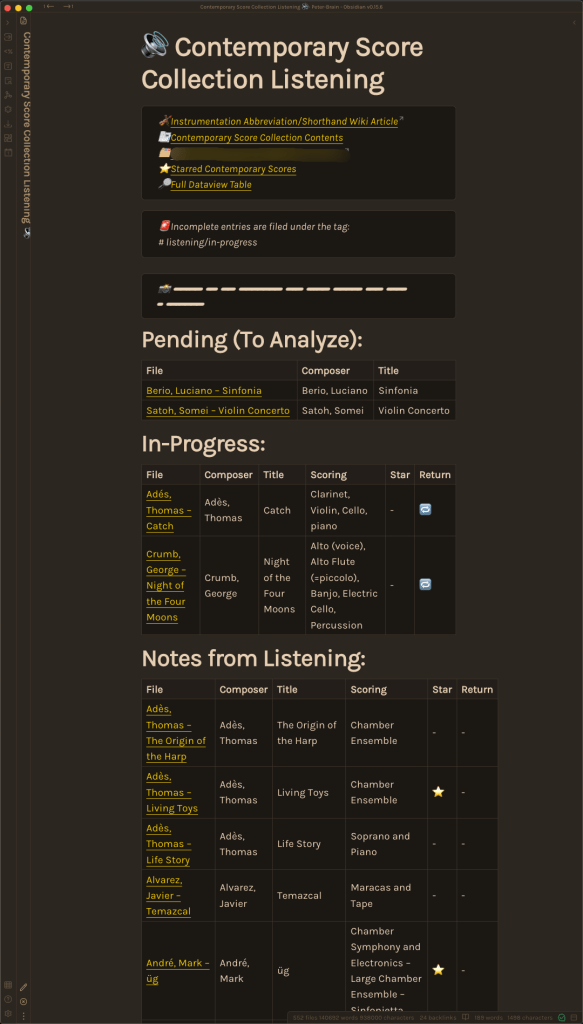
I started by setting up a sort of “database” note to serve as my starting place for score study – I’m focused on the moment of scores by contemporary composers.
At the top of the note, I’ve got a section with links to:
- The wikipedia article on instrumentation/orchestration abbreviations
- A note listing the physical scores that are available to my in my own collection and a link to scores at my local university library
- A link to the folder where I store my markdown notes on each score I listen to
- A note where the Obsidian dataview plugin tabulates the scores that I’ve starred as especially interesting or worth investigating
- A note that lists my listening notes and shows all the fields where I’ve entered data
I then have a few reminders about my tagging system so that I remember how to mark listening notes that are not yet complete.
Beneath this I have dataview blocks that tabulate pieces that I have not yet analyzed but would like to start as well as listening notes that are still in-progress.
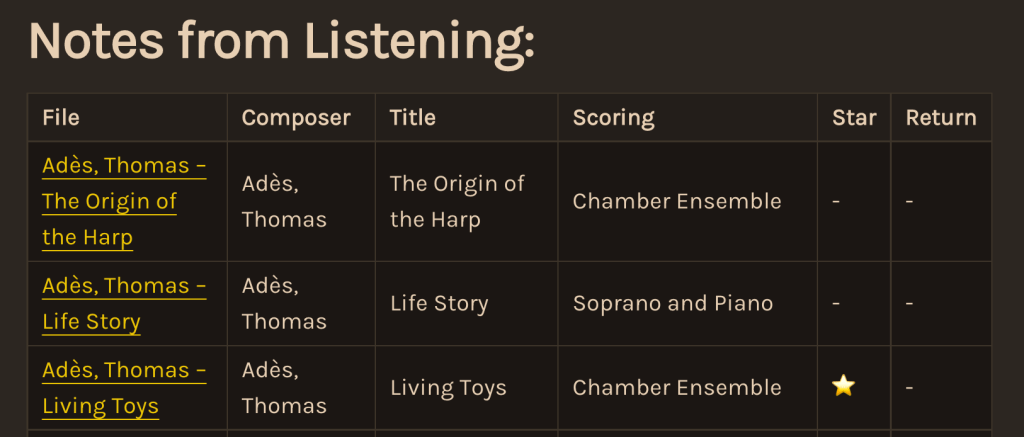
Finally, I have the heart of the project – the dataview table listing the works I’ve completed listening notes for. It has been exciting to see this list slowly grow over the past few months – it’s a motivating representation of how much I’ve learned by studying these scores!
If you’re new to dataview (or to Obsidian), you might want to take a look at some of the following resources:
- The Beginner’s Guide to Dataview by Denise Todd
- Video: An Introduction to Dataview by SkepticMystic (Obsidian Community Talks)
Next, we’ll dive into some of how I set up my listening notes to capture information that will be useful down the road. For additional context – I want my listening/score-study notes to serve a few specific purposes:
- General Reference: When I’m in a class, in a discussion with someone, or working on a piece, I want to be able to consult notes with detailed, insightful observations from some of my favorite pieces or from pieces that are important for broader discussion in the New Music and Classical Music communities.
- Indexed Searching: I want to be able to generate results for specific types of searches that will be helpful for furthering discussions with colleagues or furthering my own compositional work. these types of searches could include things like “pieces with idiomatic writing for harp,” “concerto works written after 1995,” “electro-acoustic works that feature flute,” or “pieces that draw on techniques from the Spectralist tradition.” While my digital score-study notes only number 15 entries at the moment, I hope that my ever-growing collection of score study notes will one day make these meta-data-based searches particularly fruitful for identifying works that may be useful at one point or another. (My hope is that my personal knowledge and digital database of observations will continue to naturally grow over many years).
- Cataloguing Examples: Additionally, I want my database to serve as a sort of individualized composition manual – a digital document that collects and records favorite instances of orchestration, harmonic motion, contrapuntal development, electronic techniques, etc. I aim to collect these examples both for the purposes of my own interest in studying music and developing a personal reference, but also as a tool for facilitating future composition instruction through accumulating these observations from years of score study.
Now, I’d like to dive into a sample note and explain some of the techniques that I use in taking score study notes.
To begin, I capture some meta-data regarding the work so that it will be easier to index and find again through searching in the future. When I started making these score-study notes, I used a rather inelegant solution to add this metadata as “YAML” fields. YAML is a type of computer-readable metadata that begins a markdown note. It might look something like this:
---title: "My Note"date: 08-12-2022author: Peter---
Everything that is indicated as YAML metadata between the two “‑–” borders actually “disappears” when the note is exported as a different document or viewed in “preview” mode in Obsidian. This can be helpful for fields that are annoying to see all the time.
I later learned that Obsidian provides an alternative way of including metadata in a note that is actually more helpful for me in this situation. “I will likely change to specifying score-study note meta-data through some inline fields. “Inline” metadata fields (using a double colon) accomplish the same thing and will still appear in “edit mode” when working in Obsidian. The same example from above would then look like this:
title:: "My Note"date:: 08-12-2022author:: Peter
This text would appear in the body of the note and in any formats to which the note was later exported (PDF, Word, etc.). This is more helpful because I want these meta-data fields to be both machine-readable and legible for humans to read and understand.
An example of these meta-data fields is given below:
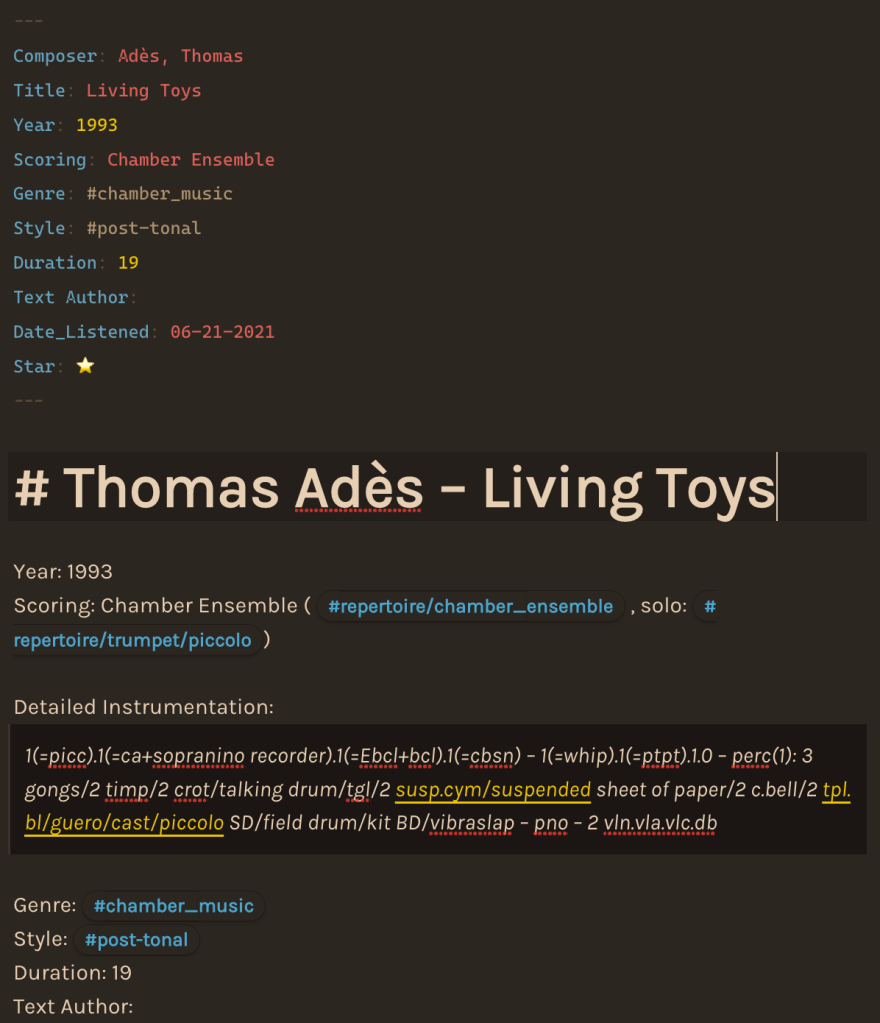
(As you can see, my use of YAML metadata has made for redundant meta-data fields that I had to duplicate – I’ll likely return to clean this all up).
I’ve found it helpful to catalogue a few items including the following:
- Composer name
- Piece title
- Composition year
- Scoring (general description)
- Genre of the piece
- Compositional style
- Duration in minutes
- Author(s) of any text(s) used
- Last listening date
- “Star” status (used to denote favorite works)
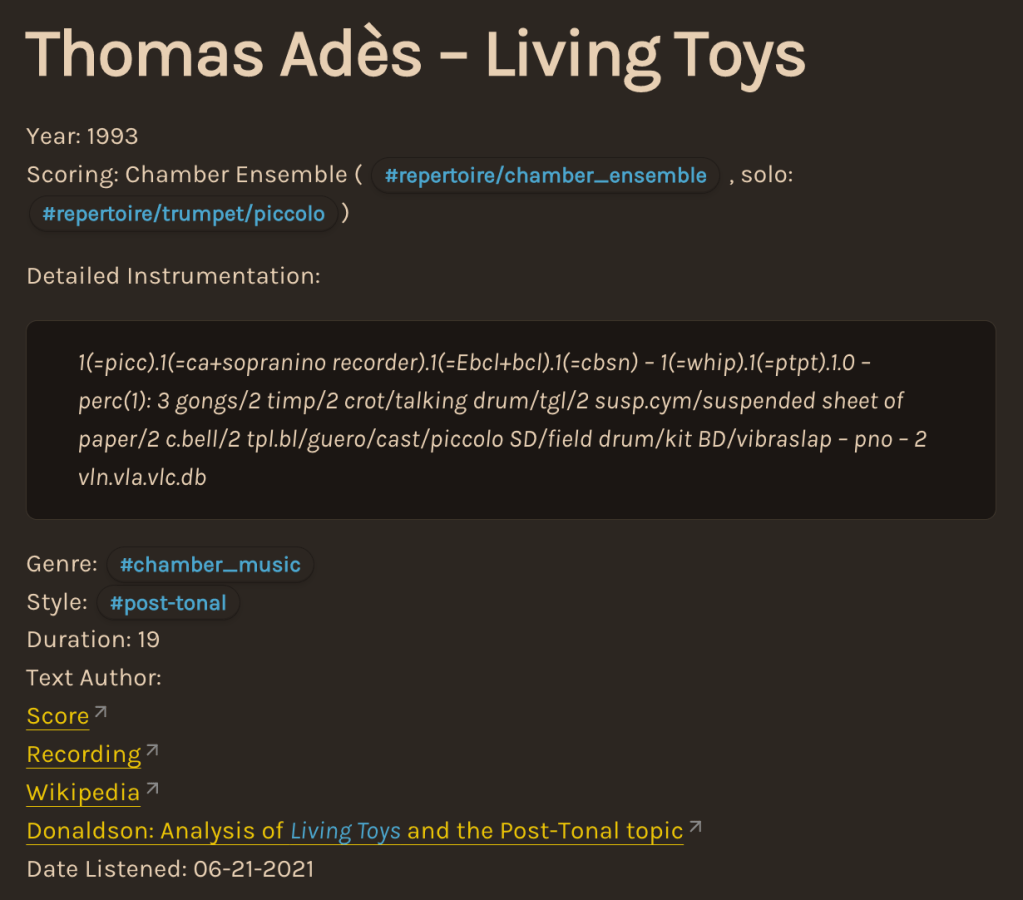
In addition I note some of the following items:
- tags for future indexed searches (in this case #repertoire/chamber_ensemble and #repertoire/trumpet/piccolo)
- a detailed instrumentation according to standardized instrumentation specifications,
- a link to the record for the score at my local university library, or an online perusal score from the publisher
- a link to a performance or recording on YouTube
- a Wikipedia article for the piece (if one exists)
- any scholarly articles, reviews, analyses, or essays of music criticism that I find interesting and relevant (in this case this essay from James Donaldson)
If I find it helpful, I then include a segment addressing the movements or formal construction of the work, as well as any crucial details from the performance or program notes that are necessary for understanding the work.
After this has been recorded, I settle in with a copy of the score and listen, marking points to return to on a note pad and making any in-the-moment observations that might be helpful later.
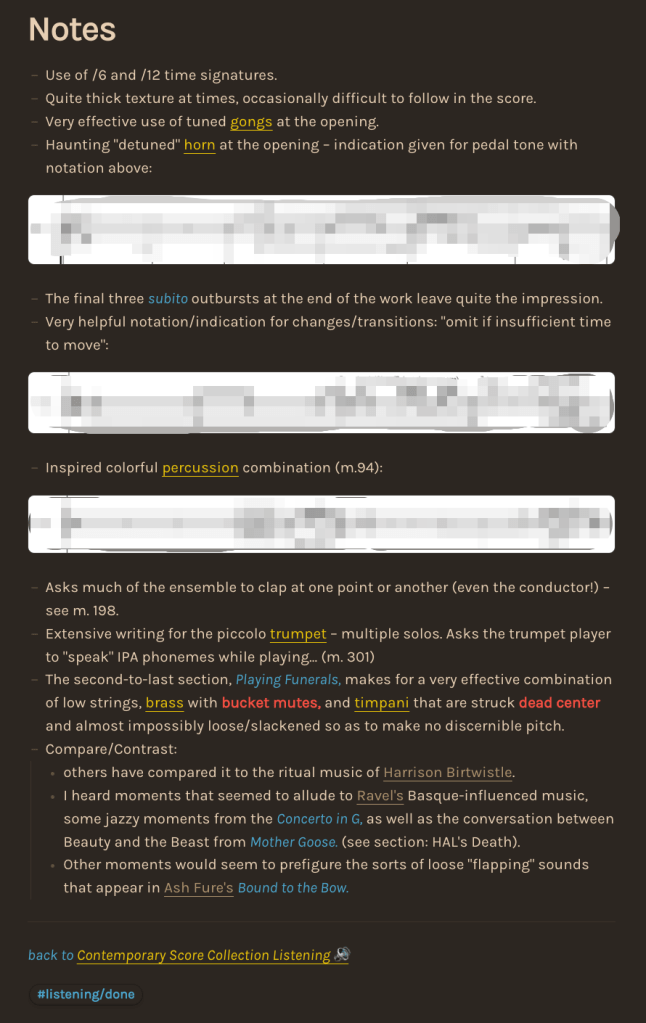
After listening, these observations are compiled at the end of the score-study note. Where I can, I try to make hyperlinks to any other relevant topics, instruments, composers, or works that may prove fruitful (even if I’ve not yet made any notes on these topics).
In addition, I sometimes select a few select instances of notation that are helpful to record. When I have not myself purchased a physical or digital copy of the score, I am careful to capture only small fragmentary examples, mindful of the fair use regulations of U.S. copyright law. (In this case, I’ve recorded just a few measures from a brass and a percussion part). Of course, public domain scores permit a much more thorough use of graphical examples for rich, visual note-taking!
Finally, I’ll observe that taking score study notes in this way has added an unexpected degree of excitement and gratification to the process of score study. I’ve been proud of my progress in a few month’s time and I feel as though every opportunity to explore a new work and record my thoughts is another chance to add to my garden of ideas about composition and about the music that I enjoy!
Next, we’ll take a look at how to actually set up the dataview dashboard for collecting your listening notes.
With some context in place, let’s look at how to set up a dataview table to make use of this information!
Dataview is a third-party plugin developed for Obsidian that enables users to run powerful queries over the notes in their Obsidian vault, creating lists or tables that will automatically tabulate and stay updated. Dataview is one of the few Obsidian plugins that I couldn’t live without.
The table for my listening list is simple:
```dataviewtable composer as Composer, title as Title, scoring as Scoring, star as Star, return as Returnfrom #listening/donesort Composer asc```
The first thing to do us enter three backtick characters in a row. This tells Obsidian that you’re about to enter some code for it to evaluate.
Immediately after the first three backticks, we enter dataview to tell Obsidian that we want the code block to be evaluated by our dataview plugin.
At that point we can get to work setting up a table with some columns of information and criteria.
We tell dataview that we’ll create a table element and then ask dataview to fetch some of the fields indicated in the previous discussion above. In this case, we’re creating the table column Composer by taking information from the composer field in our listening notes. Observe that if we wanted to, we could call the field something like author in the listening note and could access this field here in dataview through the statement author as Composer rather than composer as Composer. Or (if we didn’t want this field to appear as “Composer” at the top of our dataview table) we could do something like composer as Author or composer as "Cool Human" or composer as "My Very Favorite People Who Write Music". Note that you’ll need to use quotation marks to display dataview column headers that are more than one word long.
Next, we need to tell dataview what notes to query. In this case from #listening/done tells dataview to pull information only from notes that have the tag #listening/done. In my vault, I use a variety of tags to reflect listening notes in different states: #listening/in-progress, #listening/pending, etc.
After this, we can make the table a little easier to use by asking dataview to sort entries based on a certain column. In this case, I find it helpful to use the name of the composer as a sorting system. My entries are formatted as Last, First, but there’s nothing to keep you from creating composer_first:: and composer_last:: fields so that you can sort your table with sort composer_last asc.
As you may have guessed the asc indication tells Dataview to sort the entries in ascending order. You can use desc for descending order.
Finally, we will complete our Dataview code block by adding in another three backticks at the very end.
When everything is working correctly, your table should look something like this:
And with that we’ve successfully set up a personal score study database, ready to collect our thoughts and observations on all sorts of music!

