
As I have spent time working in OpenMusic over the past several years, I’ve become more and more familiar with using the program SPEAR for spectral analysis. The SPEAR initialism stands for Sinusoidal Partial Editing and Analysis Resynthesis and the application is free to download and use. To unpack things a little bit, SPEAR analyzes a source audio file (usually in WAV or AIFF format) and decomposes the sound into several partials (represented by line segments on the resulting graphical display, where each segment depicts the frequency variation of a sinusoidal oscillator over time). An example display is given below:
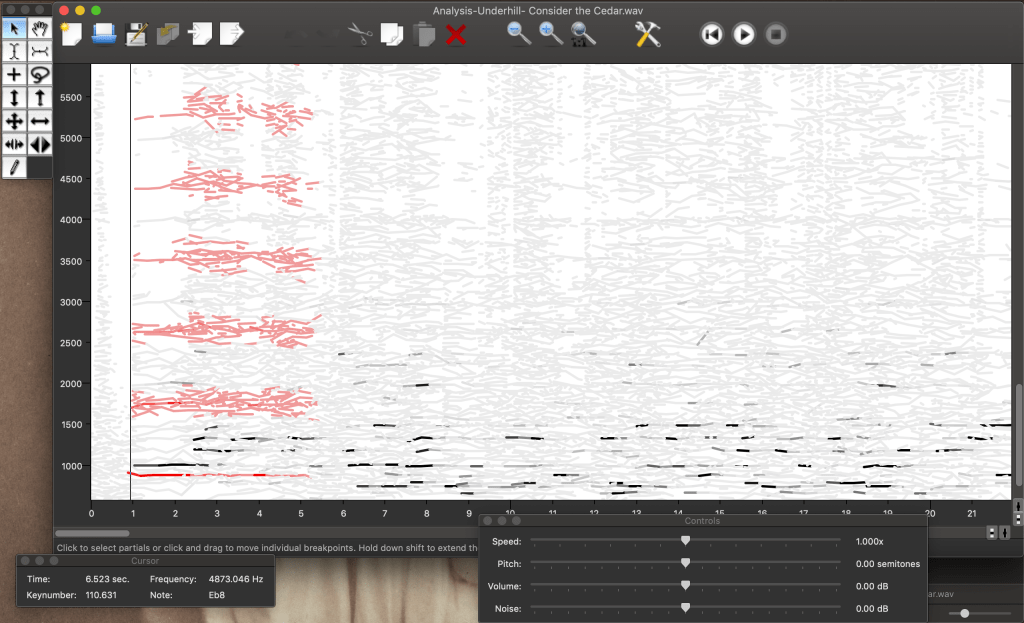
A SPEAR editor window showing an analysis of a piece for four flutes. The user has selected a single partial (the lowest red line) and has requested SPEAR to also select all of its corresponding harmonics (shown highlighted in red above).
Like in many spectrogram representations of sound, the darkness of a line corresponds to the amplitude of its corresponding partial (how loud that particular frequency is).
SPEAR is capable of some truly remarkable transformations and is an incredible compositional resource with a variety of applications. SPEAR can of course provide some very helpful information for timbral analysis to the composer including information about the frequency, amplitude, start time, and end time of one or more partials. Additionally, SPEAR itself allows users to do a fair amount of manipulation, carving out portions of a sound, amplifying specific partials, inverting, time-stretching, or frequency-shifting material in an instant. At a very basic level, users can simply select the pencil tool and “draw in” their own partials, making a one-to-one link between the graphical representation of a sound and a sinusoidal oscillator.
I’ve used SPEAR from time to time, but first extensively used it to create some specific gestures and orchestrational effects for my piece, Bitter Fruit, which premiered this past summer. (For an example, you can listen to the first 14-or-so seconds of the video at this link). In this instance, I took a brief 5-or-so-second recording of a low note on a piano prepared with a glass rod sitting on top of the strings. In this case, I had simply recorded the key being depressed fairly forcefully with a long decay. After filtering out the softest partials from the recorded sound, the resulting analysis yielded about 21 partials that I manipulated, reversing the sound in time, stretching it out over several seconds, and then shortening all of the partials dramatically to produce a gradually-solidifying “haze” of increasingly louder sine tones that coalesce into a single moment of “attack” at the end of the sound.
I was pleased with the effectiveness of this technique and received feedback from several listeners that the introduction of the work succeeded in capturing their attention and setting the atmosphere for the piece.
Finally, it’s worth mentioning that SPEAR combines nicely in a workflow with OpenMusic, with many composers influenced by spectral techniques using both software applications to analyze and manipulate the sound sources which form the basis of their works. SPEAR can export (re)synthesized sounds as WAV files in addition to exporting text files and SDIF files. This interoperability with other programs allows composers to manipulate and synthesize sounds with even more precision, using the computational capabilities of OpenMusic or other applications to make precise changes to sound files or to apply the structure of analyzed sounds to other musical parameters altogether.
SPEAR is a wonderful sandbox for exploring and manipulating sound and timbre and can quickly yield exciting results for users – if you haven’t already, I hope you’ll take a moment to dive in and explore!

